Start here
How Scout works
The loop Scout runs, from reading your site to a reviewed draft you can download, and the points where you decide.
Scout runs one loop, over and over: find topics, judge them, hand you the decision, then research, outline, draft and review the ones you approve. Every stage leaves a record you can read, and the loop stops at a person wherever a decision matters. This page walks it end to end.
1. Scout reads your site and your search data
Setup gives Scout a website address. It crawls your public pages and writes a company profile: what you sell, who you sell it to, the markets you are in, the topics you own, and the claims it should never make. You can read and edit every field of it in the Playbook.
If you connect Search Console, Scout also reads what people already type to reach you, which pages are slipping, and which queries sit just off page one. That is the strongest signal it has, and it is free to connect. See Connect Search Console.
2. Scout finds candidate topics
Candidates come from several signals at once: queries you nearly rank for, pages losing ground, competitors' pages you have no answer to, expansions around what you sell, and the pages of yours that already work. Each signal is a lane, and the queue records which lane surfaced each topic. Where a signal is unavailable, the run says so rather than pretending it looked.
3. Scout sets aside what is plainly off-market
Search volume knows nothing about your business. Before any topic is judged, Scout asks one question of each candidate: would this company have a reason to write about it for the people it sells to? Only a confident no is set aside. The queue tells you how many were set aside and shows the most searched of them, so you can check Scout's judgement. See Topics Scout set aside.
4. Scout judges fit against your company profile
What survives is judged three ways: does the topic sit in the market you sell into, would an article on it lead to something you sell, and is the person searching it one of your buyers. Fit is the heaviest part of the score, and the judgement is written out in plain sentences on each opportunity.
If you have told Scout where the business is heading, that direction outranks anything it read on your website. Change the profile or the direction and every open topic is judged again. See Direction and re-judging.
5. Scout scores and applies your guardrails
Each topic gets a score out of 100 built from eight components, each with its own explanation and evidence. A component Scout could not measure is marked "not measured" and its weight moves to the others; it is never counted as a zero.
Then the guardrails: minimum search volume, maximum keyword difficulty, minimum score, minimum fit with the business. A topic that fails one is Flagged, not deleted. It waits in the flagged pile with the reason attached, one click from the queue. See The score and Guardrails and flagged topics.
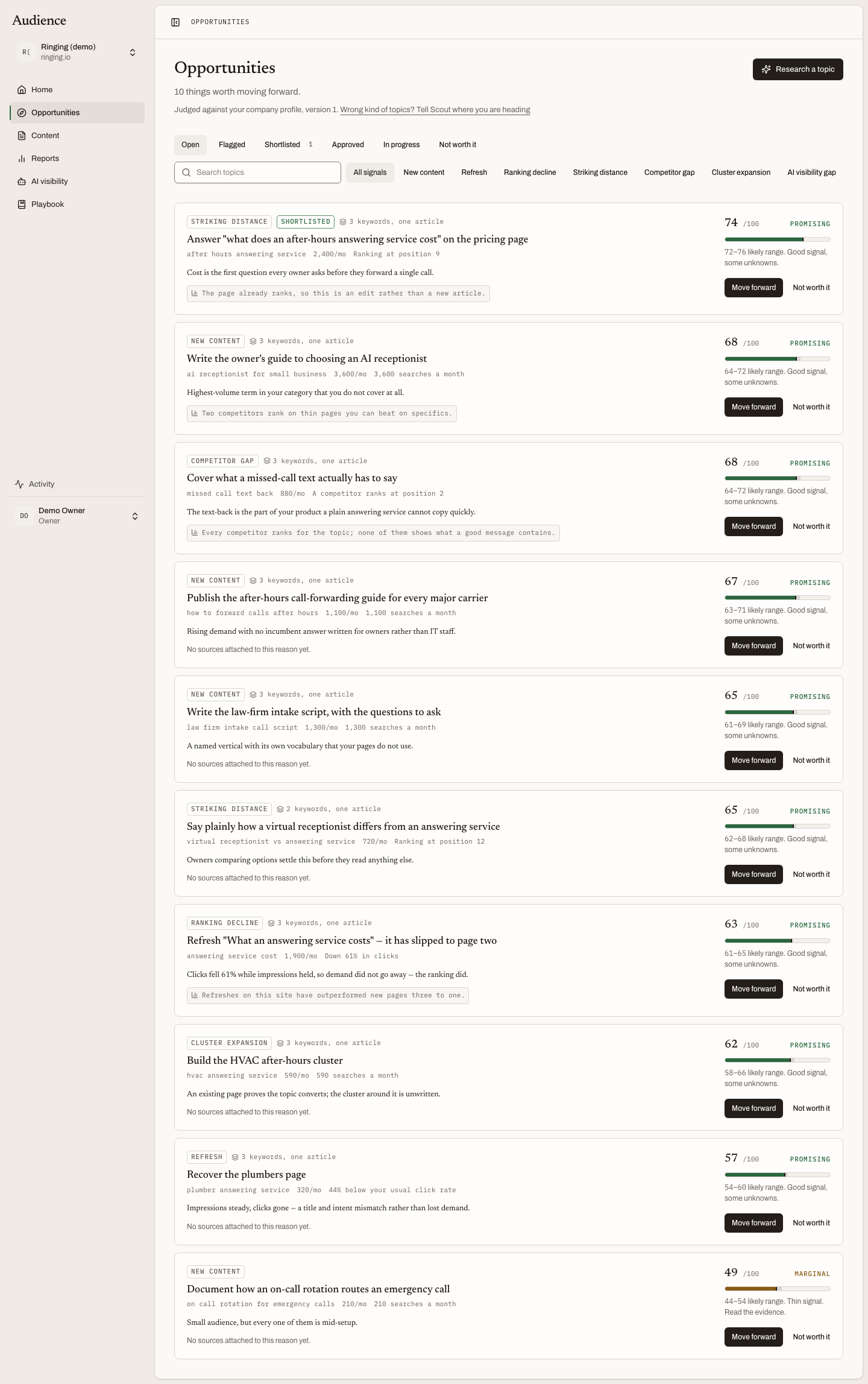 The queue is ordered by score and nothing else. Each row says which signal found it and why Scout thinks it is worth doing.
6. You decide
This is the first checkpoint, and the product's principle is stated on Home: approve the thinking before the writing. You read the reasoning, and you press one of three buttons.
- Move forward approves the topic and starts research.
- Not worth it rejects it. An optional reason teaches Scout what you do not want, and you can keep topics like it out from then on.
- Do it anyway overrides a guardrail on a flagged topic, with your reason recorded.
You can also hand Scout a topic of your own with Research a topic. It goes through the same judgement and scoring as everything else. See Deciding and Research a topic.
7. Scout researches and proposes an outline
An approved topic becomes a content item. Scout reads what ranks for the search, what searchers want, what nothing ranking covers, and the facts it can source. It writes an outline and stops.
You read the outline, edit it if you want, and press Approve outline & start drafting or Write it again with a note. What you save is the version Scout drafts from. See Topic and outline review.
8. Scout drafts and reviews its own work
Scout writes the draft from the approved outline and the research, then reviews it against a standard editorial rubric and against every rule in your playbook. The result is a quality score out of 100, a routing of Ready for review, Needs revision or Blocked, and a list of findings. Every claim is traced back to a source Scout read; one that cannot be traced is a finding.
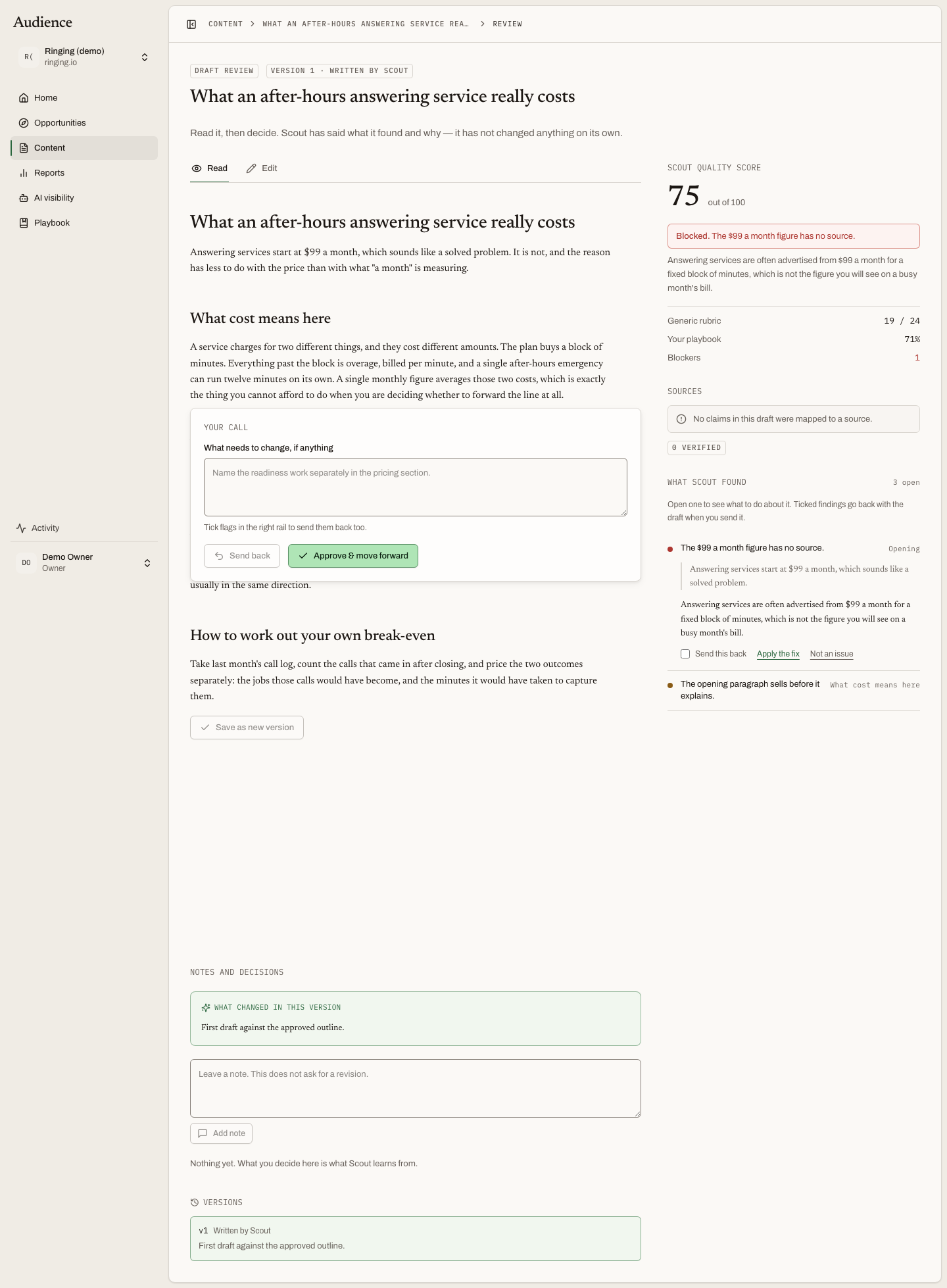 The article on the left, what Scout found on the right, and two decisions at the bottom.
9. You approve, or send it back
You read the draft and decide. Each finding can be applied, dismissed with a reason, or ticked to go back with the draft. Send back returns it to Scout with your notes; Approve & move forward marks the version approved. Scout does not change a draft on its own. See Draft review and Flags, comments and sources.
10. The article leaves as Markdown
An approved article is yours to publish. In this release it leaves Audience as a Markdown download, and you put it live in your own CMS. See Publishing and Markdown.
What keeps running
Scores on open topics refresh daily against new search data. The full rebuild, which reads the market again, runs on the cadence you set for the workspace. Once a week Scout looks at your edits and proposes rules it thinks it has learned, which you accept or turn down. Nothing that spends against your budget happens without a button or a schedule you can see. See What runs when.