Opportunities
The score
What a score out of 100 is made of, how to read the eight components on an opportunity''s page, and why "not measured" is never a zero.
Open any row in the queue and you reach the opportunity itself: the proposed title, the angle Scout suggests, why it recommends the topic, and the full working behind its score. Nothing on this page is a black box. Every point is attributed to a component, every component says what it measured, and anything Scout could not measure says so.
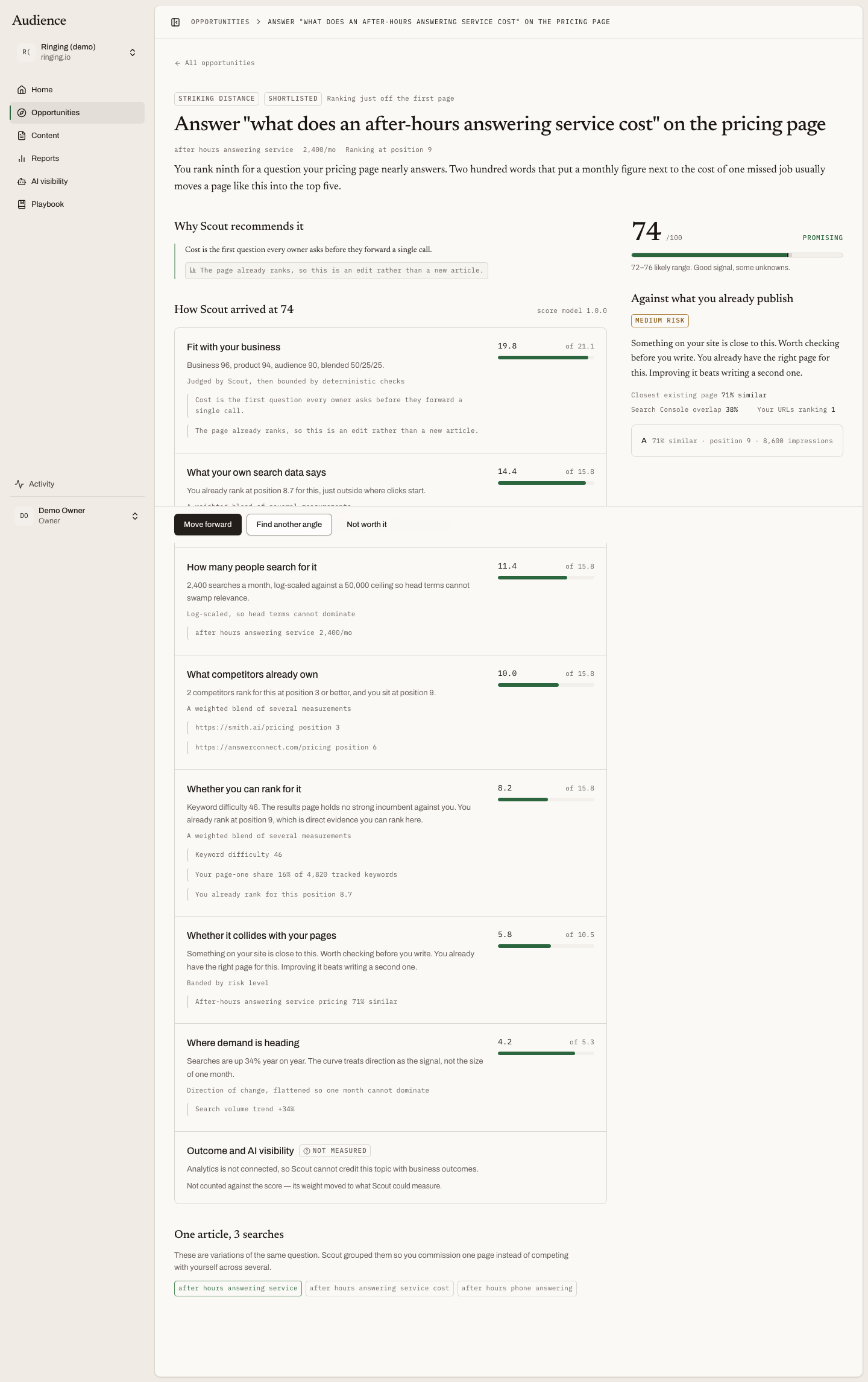 Each component shows the points it earned of the points available, and the evidence behind them.
The top of the page
The proposed title is the heading. Under it sit the keyword, its monthly searches and the primary signal, then the angle: the approach Scout thinks an article on this topic should take, written for the searcher rather than for the keyword. If the topic failed a guardrail, a panel headed This is below your guardrails comes first; see Guardrails and flagged topics.
Why Scout recommends it gives the reasons in plain sentences. Each reason carries the evidence it rests on, and clicking the evidence opens the source drawer.
How Scout arrived at the score
The score is out of 100 and is built from eight components. Each one is shown with the points it earned of the points available, an explanation in words, and the evidence it used.
| Component | What it asks |
|---|---|
| Fit with your business | Is this topic about the market you sell into, would an article on it lead to something you sell, and is the person searching it someone you sell to? Judged against your company profile. |
| What your own search data says | What Search Console shows for this query: your position, impressions and clicks. |
| How many people search for it | Monthly search volume across the grouped keywords. |
| Whether you can rank for it | Keyword difficulty set against how strongly your domain ranks today. |
| What competitors already own | Whether a confirmed competitor ranks for this and you do not. |
| Whether it collides with your pages | Whether you already have a page that answers this, and how closely. |
| Where demand is heading | Whether searches for this topic are rising or falling. |
| Outcome and AI visibility | Whether this topic is one your buyers ask assistants about, and whether an answer named you. |
Fit carries the most weight. A topic with huge demand and no fit is flagged, not shortlisted, because search volume alone knows nothing about your business.
How each number is normalised
Under every component is a line saying how the raw measurement became points, in words rather than formulas. Three you will see often:
- "Log-scaled, so head terms cannot dominate." A keyword with ten times the searches does not earn ten times the points.
- "Judged by Scout, then bounded by deterministic checks." Fit is Scout's judgement, but it is capped where the audience does not match: a topic can be no more relevant to your business than it is to your buyers.
- "Capped: Search Console is not connected." Without your own search data the component cannot rise past a ceiling, and the page says so.
Not measured is not zero
When Scout could not measure a component, the component shows a not measured badge and the line "Not counted against the score. Its weight moved to what Scout could measure." The score is still out of 100; it simply rests on fewer measurements. This is why a score can be high with Search Console disconnected and why the same topic can change when you connect it.
A topic scored before Scout began recording its working says: "This opportunity was scored before Scout started recording its working. It will explain itself after the next scan."
The confidence range
Beside the score is a range, such as 54 to 68. The narrower the range, the more of the score rests on measured components with high confidence. A wide range means Scout is reasoning from less, and the detail below says from what.
Against what you already publish
The sticky rail on the right holds the score and a second panel, Against what you already publish. This is the cannibalization check: whether writing this topic would compete with a page you already have.
- A risk badge and a one-line summary.
- Closest existing page, N% similar.
- Search Console overlap, or "not connected" when Scout cannot read it.
- Your URLs ranking for this query.
- The related pages themselves, so you can open them.
A high risk does not block a topic. It changes the recommendation: refresh the page you have rather than write a new one.
One article, N searches
When the topic groups several keywords, the page lists them under One article, N searches: "These are variations of the same question. Scout grouped them so you commission one page instead of competing with yourself across several." The number is the combined monthly demand.
The action bar
At the bottom, when the topic is open and you have permission: Move forward, Find another angle and Not worth it. See Deciding.
Related
- Guardrails and flagged topics
- Connect Search Console, the single largest change you can make to how scores are measured.