Content
Draft review
The screen where you read a draft beside everything Scout found wrong with it, then make one of two decisions: send it back with notes, or approve it and move it forward.
Draft review is the screen this product lives on. The article is on the left, Scout's findings are on the right, and two decisions sit at the bottom. Scout has read the draft against your playbook and a generic editorial rubric and said what it found and why. It has not changed anything on its own. The header says exactly that: "Read it, then decide."
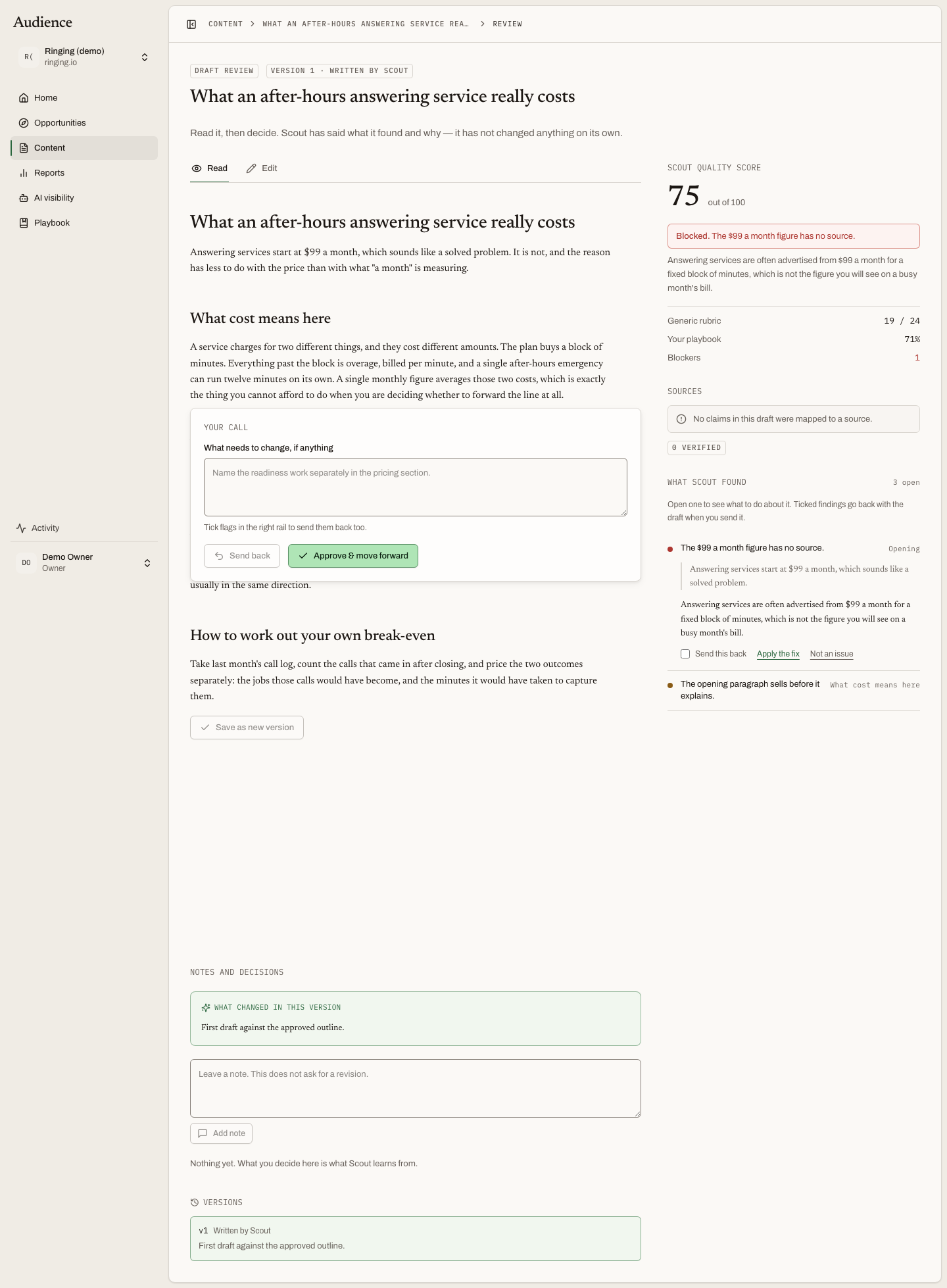 Article left, findings right, your decision at the bottom.
The header
The status badge, the version line (Version 3 · Written by Scout, or the editor's name when a person saved the last version), the title, and the keyword with its monthly searches and audience. Once a version has been approved, a Download Markdown button appears here with the line "Approved and ready. Publishing is manual, put it live yourself." See publishing and Markdown.
The article
The draft is Markdown in an editor, with three fields above it for the SEO title, meta description and slug. You can edit any of it; a saved edit becomes a new version under your name rather than overwriting Scout's.
Citation markers in the text open the source drawer at the cited source, so a claim can be checked without leaving the page. Selecting a passage, or a whole block, offers comment on this. Both are covered in flags, comments and sources.
Scout could not answer these
Where research left a question Scout could not settle, it is listed here rather than guessed at in the draft: the question, and why it matters to the piece. These are the places a person's knowledge is needed before the article goes out.
The review sidebar
The right rail is Scout's reading of the draft.
Scout quality score is out of 100. Under it, a routing line says what the score means for you:
| Routing | What it says |
|---|---|
| Ready for review | "Nothing is blocking this. Read it, then move it forward." |
| Needs revision | "Worth another pass before this goes out." |
| Blocked | Names the flag that blocks it, for example "16 of 28 claims could not be traced to a source Scout read" |
Three smaller numbers explain the score: Generic rubric x/y, the standard editorial checks the draft passed; Your playbook n%, how much of your own rules it satisfied; and Blockers n. The source-status panel underneath shows how many claims trace back to a source Scout actually read.
What Scout found is the list of flags. The panel tells you how to use it: "Open one to see what to do about it. Ticked findings go back with the draft when you send it." A draft with nothing flagged says "Nothing flagged. Read it and decide." A version Scout has not checked yet says so too. How to act on a flag is on the flags page.
Your call
The decision panel stays in view as you read. It has a notes box, What needs to change, if anything, with a placeholder that shows the tone to use: "Name the readiness work separately in the pricing section." Under it, a helper line counts what will travel with your notes: "Tick flags in the right rail to send them back too." or "{n} flags will be sent back with your notes."
Two buttons:
- Send back. The draft returns to Scout with your notes and the flags you ticked. The article moves to Changes requested, and Scout writes a new version against them.
- Approve & move forward. The version you are reading becomes the approved version. A blocked draft cannot be approved until its blocker is applied or dismissed.
On a phone the panel folds to one row until you tap Send back.
After a send-back
When Scout returns a revision, the feedback thread shows a revision summary: what it addressed, and what it did not, with a reason for each. A note it could not act on is said plainly rather than quietly skipped. Read the summary before the new version; it tells you where to look.
Failed and missing drafts
If a step stopped, the page shows the error and a Try that step again button. If there is no draft yet, it says so and offers Write the draft; while Scout is writing, it says "Scout is writing the draft now." and refreshes itself.
Who can do this
Owners, admins and editors approve, send back, apply and dismiss flags, and vouch for sources. Anyone who can view the article can comment on it. See who does what.