AI visibility
Build your prompt panel
How to choose the buyer questions Scout asks the assistants every morning, keep the right suggestions, and confirm a panel that measures you fairly.
The prompt panel is the set of questions you are measured on. Scout asks each confirmed question of an AI assistant every morning and reads the answer for whether your company came up, where, and how it was described. Because the panel decides what "visible" means for you, it is the one screen in Audience where a person commits the workspace to recurring spend, and nothing on it runs until you say so.
Open it from the AI visibility section. The page is headed Which questions should Scout ask?
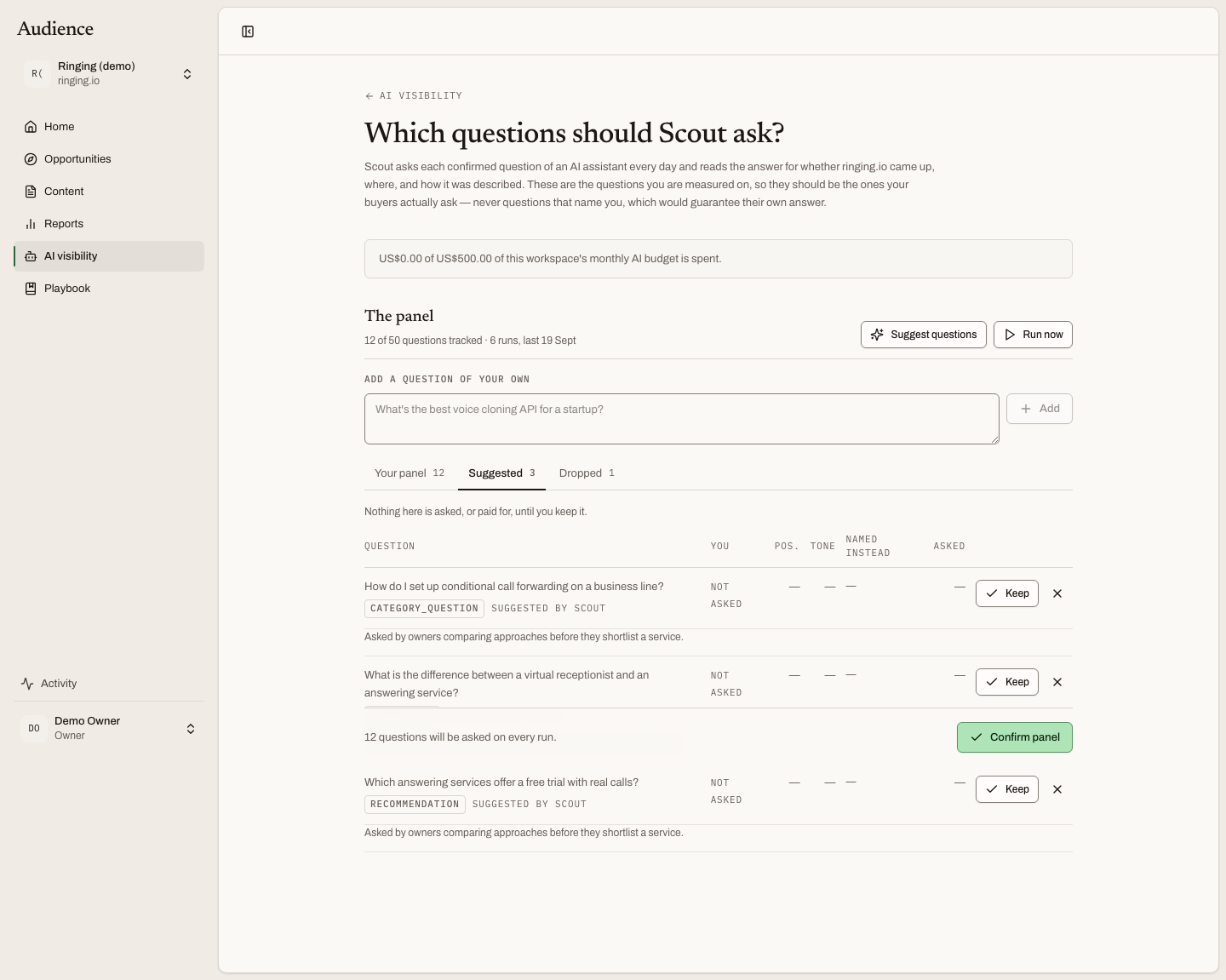 Nothing is ticked by default and nothing runs on arrival. Every proposal shows its reasoning.
Choose questions your buyers ask
A good panel is made of the questions a buyer types before they know you exist: comparisons, requests for a recommendation, questions about the category, a problem they are trying to solve. For Resemble AI (demo) that is "What is the best voice cloning API for a startup?" or "How accurate are deepfake detection tools?"
Never add a question that names you. "Resemble AI pricing" guarantees its own answer and tells you nothing about the buyers who have not heard of you. The page says the same thing in its introduction, and it is the most important rule on this screen.
Suggest questions, or write your own
Suggest questions drafts a panel from your company profile, products and audiences. It costs a model call, so it is a button and never runs automatically. Each suggestion arrives with its reasoning, so you can see why Scout thinks a buyer would ask it before you keep it.
Before your workspace has finished its first build, the page says Scout does not know enough about you yet. A panel is derived from your profile, and a model asked to invent buyer questions for a company it has not read would write a convincing panel for a company that does not exist. Finish the build first.
Add a question of your own is the box above the lanes. Type the question as a buyer would say it, and press Add. It goes straight into your panel.
The three lanes
The questions sit in three tabs. The page opens on whichever lane is asking for something.
| Lane | What it means |
|---|---|
| Your panel | Asked on every run. Dropping a question keeps everything it has already measured. |
| Suggested | Proposed by Scout, not yet kept. Nothing here is asked, or paid for, until you keep it. |
| Dropped | Not asked, and not re-proposed. Restore one to put it back on the panel. |
Each question shows an intent badge: Comparison, Recommendation, Category, Problem or Pricing. Next to it are the source (suggested or written by hand) and, once a question has been asked, when it was last asked. Expand a row to read Scout's rationale and, after a run, the domains the answer was built on.
Once a question has been measured, its row also shows You (Named, Absent or Not asked), Pos., Tone, Named instead and Asked, the number of times it has been run.
Keep, drop, restore, confirm
- In Suggested, Keep moves a question to your panel; drop sends it to Dropped, and Scout will not propose it again.
- In Your panel, drop removes a question from future runs. Its history stays.
- In Dropped, Restore puts a question back.
Nothing takes effect until you press Confirm panel in the footer. The footer tells you what you are about to commit to: "12 questions will be asked on every run." A panel can track up to 50 questions. Over that, the footer says A panel can track 50 questions. Untick n to save. and the button waits until you do.
The budget line and Run now
Above the list, a line shows how much of this workspace's monthly AI budget is spent, against its ceiling. Near the ceiling it turns amber and adds that the panel stops asking once the ceiling is reached, and reports the shorter sample it took rather than counting the unasked questions as misses. Costs and cadence explains the rest.
Run now asks every confirmed question today instead of waiting for tomorrow morning. It is an explicit spend, which is why it is a button. The first results usually land within a few minutes, and the Overview fills in as they do.
What happens next
Once a panel is confirmed, Scout asks it every morning. Read the results on Where you stand, and act on the losses in This week's moves.