Playbook
Your company profile
What Scout believes about your company, where that belief comes from, and how to correct it or accept what a re-read of your website found.
Every topic Scout proposes is judged against one document: its profile of your company. The Playbook's Your company tab shows that profile in full, under the heading What Scout knows about you. Nothing here is hidden, and everything is yours to change.
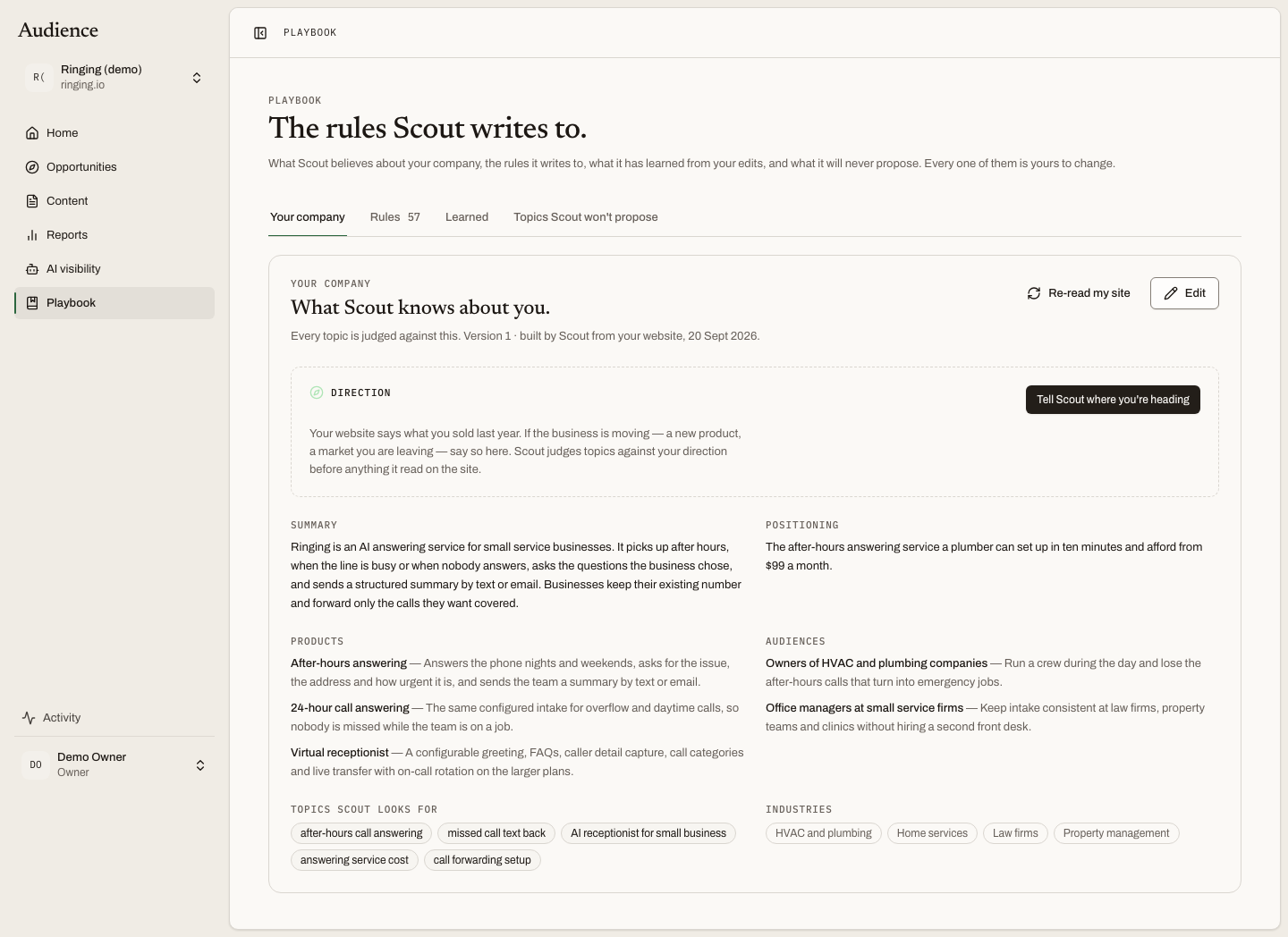 Every topic is judged against this. The version and its author are always shown.
What the profile holds
| Field | What it is used for |
|---|---|
| Summary | What the company does, in a paragraph. |
| Positioning | How it wants to be seen against alternatives. |
| Primary market | Who it sells into. |
| Brand voice | How the writing should sound. Drafts are checked against it. |
| Products | Each product with a sentence on what it does. Fit asks whether an article could lead to one of these. |
| Audiences | Who the buyers are and what they are trying to get done. Fit asks whether the searcher is one of them. |
| Topics Scout looks for | The core subjects. These seed what Scout searches around. |
| Industries | The sectors the company serves. |
Versions and who wrote them
The line under the heading says which version this is and where it came from: "Version 1 · built by Scout from your website, 15 September" or "edited by Dana". Every change makes a new version, so the queue can always say which version a topic was judged against.
Before any profile exists, the tab says: "Scout has not built your company profile yet. It is written from your website and documents when your workspace is set up. Until then, topics cannot be judged against your business."
Direction
The panel at the top of the profile is the one part a person states rather than Scout infers. It is covered on its own page: Direction.
Editing
Edit opens the profile as a form, with the direction fields first, then Summary, Positioning, Primary market, Brand voice, and repeatable rows for Products (name and "What it does, in a sentence") and Audiences (who they are and what they are trying to get done). Core topics, industries and value propositions are one per line.
Saving writes a new version attributed to you, and Scout re-judges every open topic against it. See Direction and re-judging for what that moves.
Owners and admins can edit. Everyone can read.
Re-read my site
Re-read my site asks Scout to crawl your website again and compare what it finds with the current profile. The button's note says it plainly: "Crawl your website again and show what changed before anything moves."
Nothing changes on its own. When the re-read finishes, one of two things appears.
If something changed, a card headed Your website says something new: "Scout re-read it on 20 September and would change 3 things. Nothing moves until you say so." Each field is shown before and after, with additions and removals marked. Keep mine dismisses the proposal. Accept as version N makes it the live profile and re-judges the queue.
If nothing changed: "Scout re-read your website on 20 September and found nothing that changes this profile."
The page updates itself while a re-read is running, so you can leave it and come back.
Related
- Direction
- Add your knowledge, the documents that feed the profile and the rules.